Build Your First Module: Copy, Change and Connect with Events
Copying the orders sample into a new module, adding a feature, and connecting modules with events.
A module in saas-backend-v2 is a folder that owns its tables, routes and workers, and never imports another module. The quickest way to build one is to copy the orders sample.
This post builds a tickets module that way, adds a feature to it, and uses an event to make another module react. I ran these steps on a clean copy, and they turned up four traps that the checks don't catch.
How modules are organized
Each file has one job, which is what lets you change one part without touching the rest.
| File | Its job |
|---|---|
models.py | What the module stores |
schemas.py | What its HTTP API accepts and returns |
repository.py | The only code that touches its table |
service.py | The business rules, with dependencies passed in |
events.py | The events it publishes: its public contract |
container.py | Builds the real clients and reads settings |
api.py, handler.py | The routes, and the Lambda entry point |
listener.py | Reacts to other modules' events |
This follows AWS's database-per-service pattern, though all modules still deploy from one stack.
Step 1: Copy and rename
Work on a branch. This keeps the sample in place, so you can compare against it.
cp -R modules/orders modules/tickets
mv modules/tickets/src/orders modules/tickets/src/tickets
find modules/tickets -name __pycache__ -type d -prune -exec rm -rf {} +
find modules/tickets -type f \( -name '*.py' -o -name '*.toml' \) -exec perl -pi -e \
  's/orders/tickets/g; s/Orders/Tickets/g; s/ORDERS/TICKETS/g; s/order/ticket/g; s/Order/Ticket/g; s/ORDER/TICKET/g' {} +
uv sync --all-packages
The module now has a ticket with the order's fields (item, quantity, price_cents). You'd replace those with your own, but keep them for now, so the copied tests still apply.
Step 2: Add its plan limit
Run the tests:
uv run pytest modules/tickets17 of the 29 tests fail with KeyError: 'max_tickets'. The rename also renamed the plan limit, and the plan catalog doesn't have that one yet. Add it to each plan in layers/shared/layer/shared/plans.py:
"free": {"name": "Free", "price_usd_month": 0, "max_users": 3, "max_orders": 100, "max_tickets": 100,Use "max_tickets": 10_000 for Pro and None, meaning unlimited, for Business. All 29 tests now pass.
Notice that the limit needed no new code: the DynamoDB condition you copied already enforces it.
Step 3: Add it to the template
Copy everything in template.yaml from the Module: orders heading down to the Module: audit heading, and paste it above Module: audit. In the copy, replace orders with tickets, keeping each word's capitalization, so OrdersTable becomes TicketsTable and /orders becomes /tickets. Replace order with ticket too.
That one section gives you the table, the API function and routes, the listener, its queue, its dead-letter queue and an alarm.
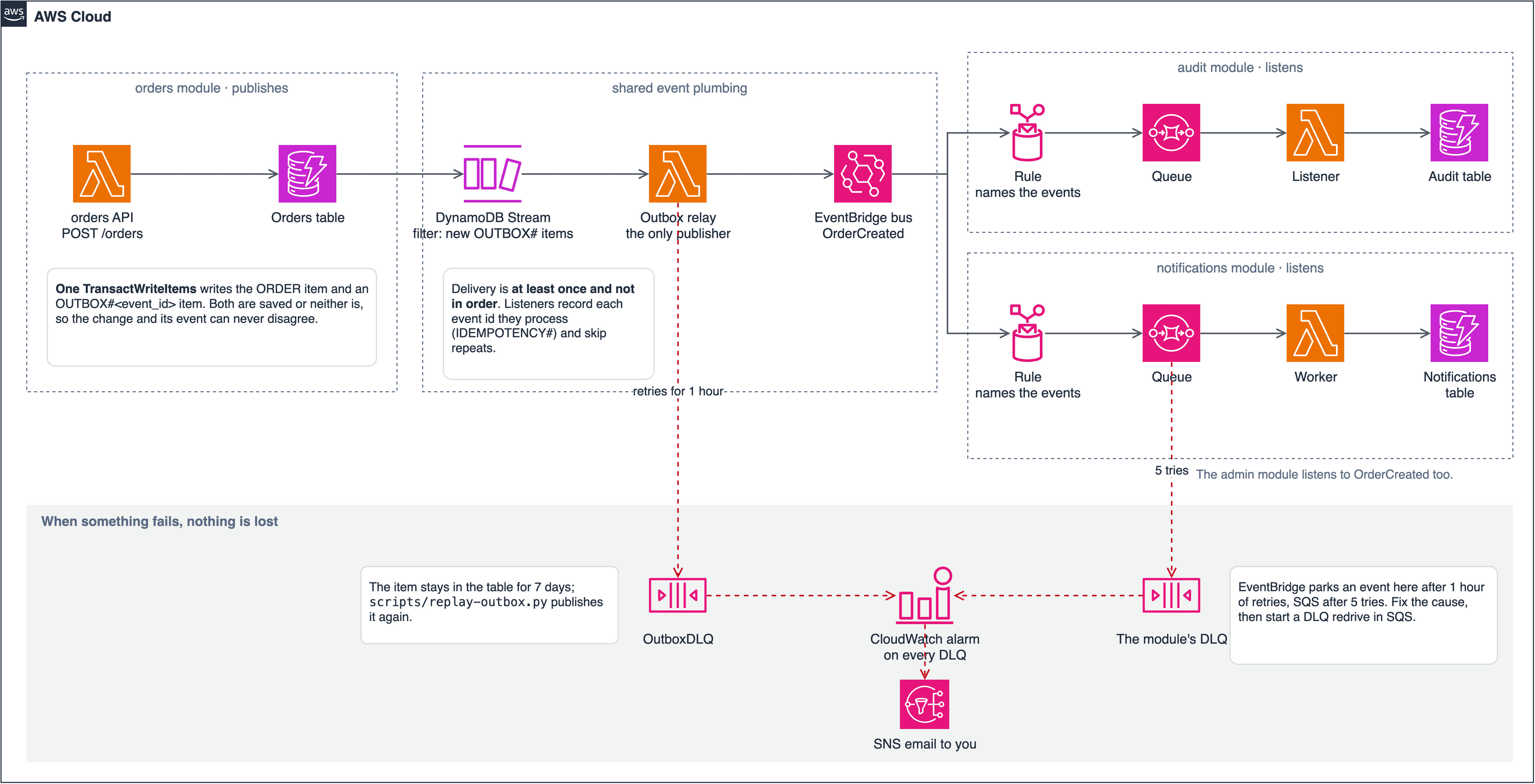
Trap 1: events go nowhere until you connect the stream. The relay that publishes events is outside that section, so your module would save events that are never sent. Nothing fails, and every check still passes. Add your table to OutboxRelayFunction's Events, copying the Orders entry:
Tickets:
  Type: DynamoDB
  Properties:
    Stream: !GetAtt TicketsTable.StreamArn
    StartingPosition: TRIM_HORIZON
    BatchSize: 50
    FunctionResponseTypes: [ReportBatchItemFailures]
    BisectBatchOnFunctionError: true
    MaximumRetryAttempts: -1
    MaximumRecordAgeInSeconds: 3600
    DestinationConfig: { OnFailure: { Type: SQS, Destination: !GetAtt OutboxDLQ.Arn } }
    FilterCriteria:
      Filters: [{ Pattern: '{"eventName": ["INSERT"], "dynamodb": {"Keys": {"pk": {"S": [{"prefix": "OUTBOX#"}]}}}}' }]
Trap 2: the alarms and dashboard don't know about you. The shared alarms and the dashboard list functions by name. Search template.yaml for OrdersApiFunction and OrdersListenerFunction, and add your functions wherever they appear outside your section. Your canary rollback and duration alarms depend on it.
Step 4: Add a feature
Let's add a priority to tickets. Features follow the same path each time.
First, the stored shape, in models.py:
class TicketPriority(StrEnum):
    NORMAL = "normal"
    HIGH = "high"


class Ticket(BaseModel):
    ...
    priority: TicketPriority = TicketPriority.NORMAL  # tickets saved before this field read as normal
Next, what the API accepts, in schemas.py:
class TicketCreate(BaseModel):
    ...
    priority: TicketPriority = TicketPriority.NORMAL
Then the rule, in service.py. Copy fields across explicitly, so a new request field can't be stored by accident:
ticket = Ticket(tenant_id=tenant_id, created_by=user.user_id,
                item=data.item, quantity=data.quantity, price_cents=data.price_cents,
                priority=data.priority)
Then test it, including the case people forget: items stored before this change existed.
def test_a_ticket_saved_before_priority_existed_reads_as_normal(ctx, alice):
    _, ticket = ctx.api("POST", "/tickets", alice, TICKET)
    ctx.table.update_item(Key={"pk": "TENANT#t1", "sk": f"TICKET#{ticket['ticket_id']}"},
                          UpdateExpression="REMOVE priority")
    assert ctx.api("GET", f"/tickets/{ticket['ticket_id']}", alice)[1]["priority"] == "normal"
That's the rule whenever stored items change shape: decide how old items are read or backfilled. Here the default handles it, so no backfill is needed.
A new route would also go in api.py, and in template.yaml if its method and path aren't covered yet. Routes there are per method, so POST /tickets/{id}/close needs an entry even though GET /tickets/{proxy+} exists.
Step 5: Tell other modules with an event
Modules never call each other's code, so choose how to share information by what the caller needs.
| You need | Use | Example |
|---|---|---|
| Facts about the caller | The login token | Reading the plan to check a limit |
| To say something happened | An event | TicketCreated, which others can react to |
| To act for the user, right now | The public HTTP API, with the user's token | The assistant's tools |
Your copied module already publishes TicketCreated, because the repository saves it in the same transaction as the ticket. That's the transactional outbox pattern: a change can't happen without its event, or an event without its change.
# modules/tickets/src/tickets/repository.py
transact(
    self.table,
    limit={"Update": counter},
    ticket={"Put": {"Item": item, "ConditionExpression": "attribute_not_exists(pk)"}},
    event=outbox_put(event),
    idempotency=idempotency_put(_pk(ticket.tenant_id), ticket.created_by, *idempotency, ticket.ticket_id),
    active=active_condition(self.table, ticket.tenant_id),
)
To make notifications react, make two changes. Add a handler in modules/notifications/src/notifications/service.py:
def _on_ticket_created(self, d: dict) -> None:
    self._in_app(d, d["user_id"], "Ticket created", f"Your ticket for {d['item']} was created.")

HANDLERS = {
    "OrderCreated": _on_order_created,
    "TicketCreated": _on_ticket_created,
    ...
}
And add the event to NotificationsRule in template.yaml, so it reaches the queue at all:
detail-type: [OrderCreated, TicketCreated, UserInvited, SubscriptionChanged, PaymentFailed, MemberRemoved, TenantDeleted, ExportRequested, ExportReady]Test it the way a real delivery arrives:
def test_ticket_created_becomes_in_app_notification(ctx):
    ticket = with_event_ids({"tenant_id": "t1", "user_id": "alice", "ticket_id": "x1", "item": "Printer"})
    assert ctx.deliver("TicketCreated", ticket) == {"batchItemFailures": []}
    assert notes(ctx)[0]["title"] == "Ticket created"
Events can arrive twice or out of order, because EventBridge delivers at least once. When you write a listener, ask what happens if the event arrives twice, and what happens if it arrives after a newer one.
Trap 3: new modules aren't in exports or the audit log. Your listener writes its part of a workspace's export, but accounts only waits for the parts it lists. Add "tickets" to the list in modules/accounts/src/accounts/service.py, and update test_exports.py, which checks that list. To log the event in the audit trail, add it to AUDITED in modules/audit/src/audit/service.py and to AuditRule.
Trap 4: gen:api changes more than you'd expect. It adds your module's types, and it also changes the web app's copy of the plans, because you added a limit. Commit both, or CI fails.
Step 6: Run every check
./scripts/export-requirements.sh
uv run pytest
./scripts/export-requirements.sh --check
uvx ruff check .
uvx cfn-lint template.yaml .github/deploy-role.yaml
(cd web && pnpm gen:api && pnpm typecheck && pnpm lint && pnpm test && pnpm build)
Then deploy to dev, as in the deploy post. Before you add real features, replace the copied item, quantity and price_cents fields, and add your module's pages under web/src/features/. Once you no longer need the sample, the README's "The sample module" section lists everything to remove.
What I tested
I ran this on a clean clone at commit 31da65a, except the alarm and dashboard edits in Trap 2 and the audit change in Trap 3. I tried the export change only far enough to confirm that test_exports.py needs updating. With the module, the priority feature and the notification in place, plus the agent from the next post, the backend suite grew from 372 to 405 tests and all passed. Lint, the template check and all 130 web tests passed too, and the web app built.
I didn't deploy this example, so the stream connection in Trap 1 has only been checked by the template linter, not by a real event. Run the smoke test on your own module's routes after you deploy.
Next, add your own AI agent.